Launch readiness review
This is a fictional launch scenario for practicing review. Review Copilot is an example product, not an announced Commentary feature.
Executive summary
Review Copilot is ready for a controlled rollout to documentation-heavy teams that already use Commentary for rendered Markdown reviews. The launch should emphasize that reviewers start from the rendered artifact, then move to raw, diff, provider, or presentation views only when those tools answer a specific question.
The strongest launch story is not "another AI review bot." It is a review loop where generated documents, support handoffs, and app-preview comments stay readable enough for humans while agents receive bounded context they can act on.
Launch decision
Ship to the first three design partners after support receives the fallback language, the docs team verifies the customer FAQ, and product confirms that Pro-preview features remain usable during the no-billing phase.
| Decision area | Current state | Launch requirement |
|---|---|---|
| Rendered Markdown review | Ready | Keep rendered view as the default PR entry point. |
| Static HTML review | Ready with sandbox language | Support must explain why scripts are blocked. |
| Live Preview Review | Needs final wording review | Billing and checkout must agree on when a plan change takes effect. |
| Draft review with Consensus | Pending decision | Assign the escalation owner before accepting the rollout plan. |
Acceptance criteria
- Product confirms the pilot scope and names the person who makes the launch decision.
- Operations names the rollback owner, the stop condition, and the evidence from a rollback check.
- Support verifies the customer FAQ against the release memo.
- A reviewer inspects the exact revision and records acceptance; an agent completion report alone is insufficient.
Compare the proposal
Start in Document to read the current launch plan. Switch to Changes and choose All PR changes to compare the proposal with the base branch. Keep Preview selected to read the rendered changes, or use Raw when exact source matters. Compare the launch decision and rollback criteria before deciding whether the proposal is ready.
Visual review walkthrough
Activate visual annotation, drag a rectangle around a specific part of an image or diagram, and submit the normal review comment. Use Fit and zoom controls to inspect detail without turning the review into a drawing tool.
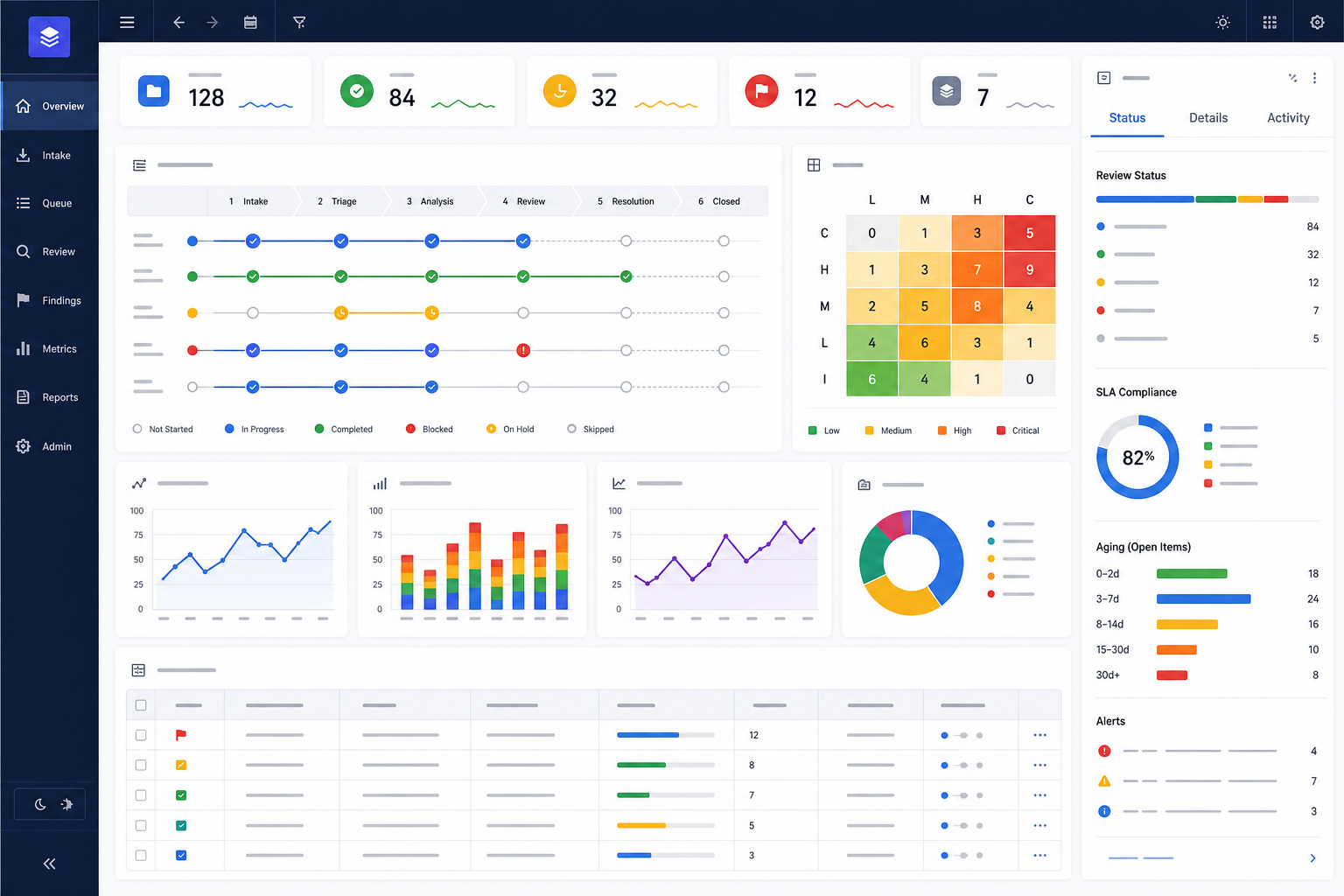
Operations dashboard
Annotate the blocked red timeline item, the critical cells in the risk matrix, or the aging panel that needs an explicit owner.
Source-backed workflow
The SVG remains available in Raw while Preview supports region comments. Try annotating the dashed rollback route or the ownership handoff between Render and Review.
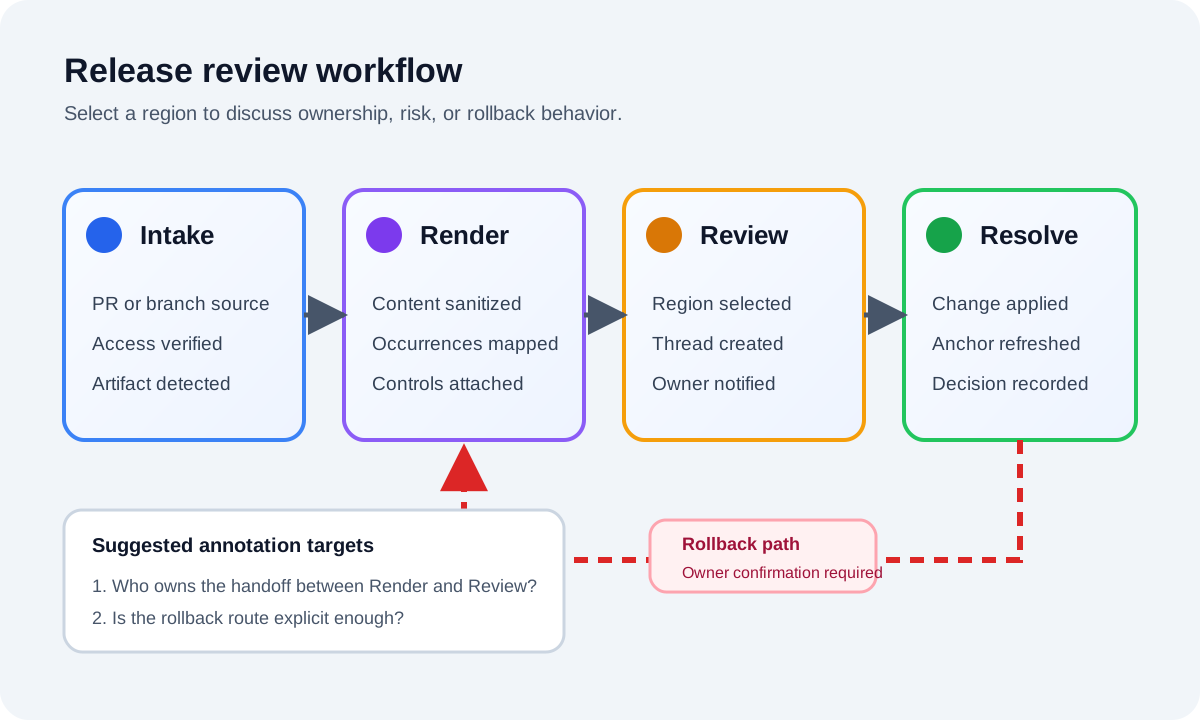
The same source appears again below. A comment on this occurrence should not place a marker on the occurrence above.
Mermaid lifecycle
flowchart LR
  Intake[Repository intake] --> Detect[Detect visual artifact]
  Detect --> Render[Render safe preview]
  Render --> Annotate[Select a review region]
  Annotate --> Discuss[Discuss in a thread]
  Discuss --> Resolve[Apply and verify change]
  Resolve -. rollback if verification fails .-> Render
Rendering diagram...
The same diagram is also available as a standalone Mermaid artifact so Raw and Preview behavior can be reviewed independently.
Reviewer experience
Reviewers should see a document-first workspace with file navigation, compact review state, and comments tied to the text they are actually reading. The raw diff is still available, but it should feel like a supporting tool instead of the main surface.
launch_gate:
  owner: product
  required_checks:
    - support_faq_reviewed
    - billing_and_checkout_verified
    - acceptance_matches_revision
    - rollback_owner_named
Rollback plan
If the rollout exposes broken anchors, confusing share access, or provider sync failures, disable the feature flag for the affected organization. Keep existing review threads available, keep provider comments intact, and move active reviewers back to standard rendered Markdown review until the affected workflow is repaired.
Support should capture the review route, provider, surface type, and latest refresh state. Do not copy raw private repository URLs, customer Markdown, access tokens, or screenshots into telemetry.
Open review notes
- Confirm the rollback owner is named in customer-facing copy.
- Add one screenshot of the rendered review shell to the FAQ.
- Verify the billing and checkout wording against the proposed customer announcement.
- Make sure support can explain why raw diffs remain available but secondary.
- Record the human launch decision against the exact revision after checking the evidence.