Markdown compatibility2 detected · 0 enabled · 0 missing assets · mkdocs docs · 2 warnings
- HomeREADME.md
- Getting starteddocs/getting-started.md
- Core conceptsdocs/core-concepts.md
- Demo walkthroughdocs/demo-walkthrough.md
- Review pull requestsdocs/review-pull-requests.md
- Review repository branchesdocs/review-repository-branches.md
- Draft reviewsdocs/draft-reviews.md
- Brainstorming Reviewsdocs/brainstorming-reviews.md
- Live Preview Reviewsdocs/web-app-reviews.md
- Commentary Formsdocs/commentary-forms.md
- Review progressdocs/review-progress.md
- Review modesdocs/review-modes.md
- Workspacedocs/workspace.md
- Markdown renderingdocs/markdown-rendering.md
- Markdown extensionsdocs/markdown-extensions.md
- Static HTML reviewdocs/static-html-review.md
- Knowledge Braindocs/knowledge-brain.md
- Access and authenticationdocs/access-and-authentication.md
- Developer accessCurrent page
- Generate a GitHub PATdocs/generate-a-github-pat.md
- Azure DevOpsdocs/azure-devops.md
- Commentary CLIdocs/commentary-cli.md
- Agent skillsdocs/agent-skills.md
- API and MCPdocs/api-and-mcp.md
- API referencedocs/api/reference.md
- MCP toolsdocs/api/mcp-tools.md
- Blogdocs/blog.md
- Troubleshooting and FAQdocs/troubleshooting-and-faq.md
- MkDocsMkDocs is a Pro Markdown feature that is not enabled for this viewer. MkDocs-specific syntax remains visible as ordinary Markdown when compatibility rendering is unavailable.
- Repository link validationPro can validate links across this repo. Links still render with standard repository-aware rewriting.
Developer Access
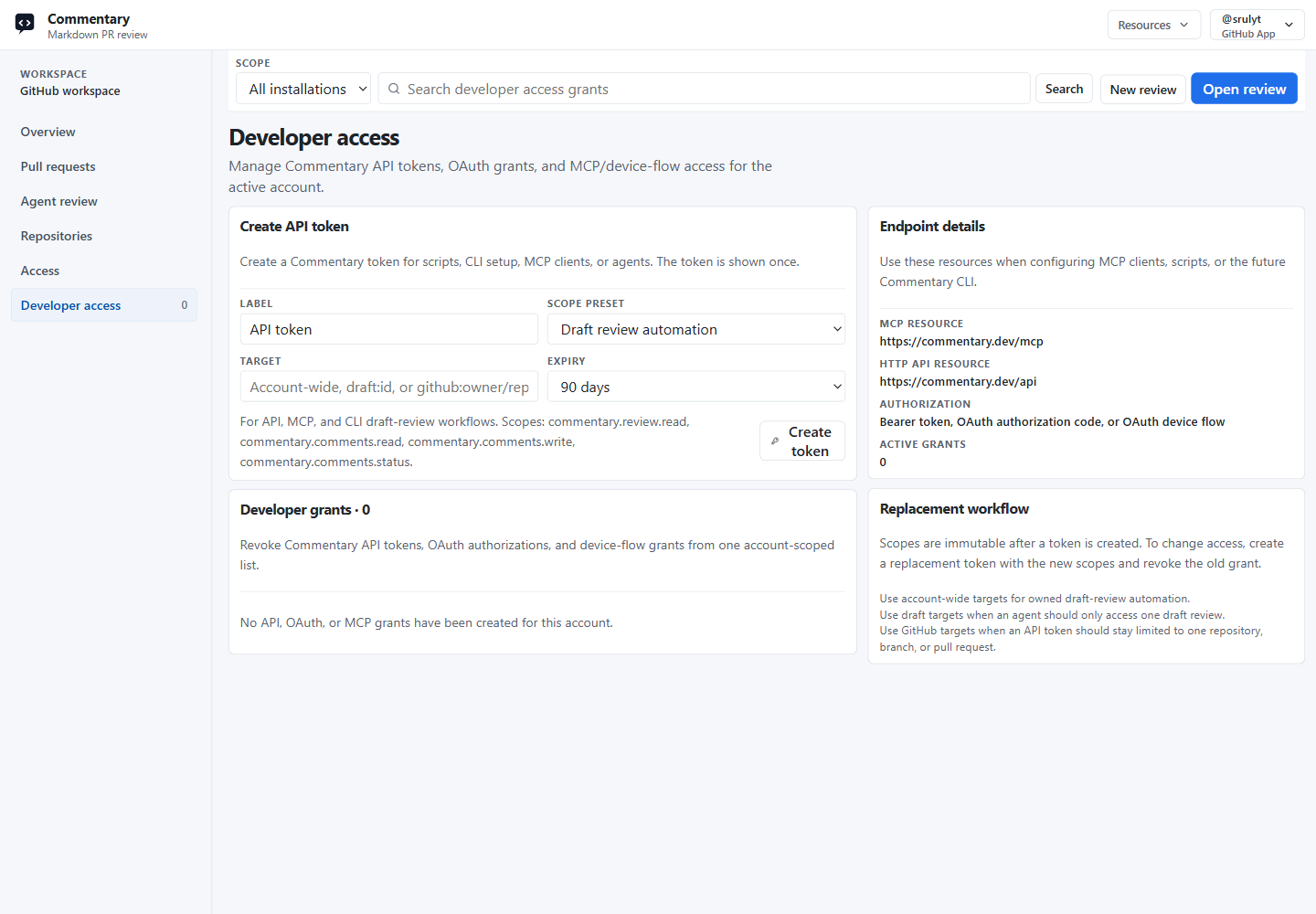
Developer access is the signed-in workspace area for managing Commentary credentials used by scripts, API clients, MCP clients, CLIs, and agents.
Open /workspace/developer after signing in.
What You Can Manage
Developer access shows and manages:
- API tokens created by the signed-in account
- OAuth authorization grants
- OAuth device-flow grants used by terminal and MCP clients
- active, expired, and revoked grant state
New API tokens are shown once. Copy the token before leaving the page. Later lists only show the token hint.
Create An API Token
- Open
Workspace. - Choose
Developer access. - Enter a label.
- Choose a scope preset or
Custom scopes. - Set a target when you want to restrict access.
- Choose an expiry.
- Click
Create tokenand copy the token.
Scopes are immutable after creation. To change access, create a replacement token and revoke the old grant.
Scope Presets
Developer access offers common presets:
Read reviews and commentsfor tools that inspect review sessions and comments.Standard API and MCPfor trusted clients that need the full supported Commentary automation surface.Draft review automationfor API, MCP, and CLI draft-review workflows.Draft review deletionfor trusted cleanup tools.Review and submitfor trusted tools that can submit provider review decisions.Brain evaluationsfor agents that submit or read Knowledge Brain evaluations.Custom scopesfor selecting individual scopes.
Brainstorming Review automation uses the same review and comment scopes as draft-review automation, plus Brainstorming feature access when the operation reads or updates consensus state.
Forms automation uses commentary.forms.read, commentary.forms.write, commentary.forms.submit, and commentary.forms.writeback. Live Preview Review sharing uses commentary.review.share.
The generated token stores the concrete scope names, such as commentary.review.read, commentary.comments.write, commentary.forms.submit, or commentary.draft_reviews.share.
Available External Scopes
Current public scopes are:
commentary.review.readcommentary.comments.readcommentary.comments.writecommentary.comments.statuscommentary.review.sharecommentary.draft_reviews.deletecommentary.draft_reviews.sharecommentary.review.submitcommentary.forms.readcommentary.forms.writecommentary.forms.submitcommentary.forms.writebackcommentary.brain.evals.readcommentary.brain.evals.write
Use the smallest scope set that covers the client workflow.
Targets
Targets limit where a token can operate.
Common target formats are:
- account-wide: leave the target blank
- repository:
github:owner/repo - pull request:
github:owner/repo:pull:123 - branch:
github:owner/repo:branch:main - draft review:
draft:{sessionId}
Use account-wide targets for Live Preview Review automation, owned draft-review automation, and owned Forms result management. Use draft targets when an agent should only access one draft or Brainstorming Review. Use GitHub targets when a token should stay limited to one repository, branch, or pull request. Review-scoped tokens can read or submit embedded Forms only when their sourceContext identifies the covered review.
MCP And Device Flow
MCP clients can use the /mcp endpoint with bearer authentication. Device-flow clients start at /oauth/device/code, show the user code, ask the reviewer to open /device, and exchange the approved device code at /oauth/token.
The developer access page lists device-flow and OAuth grants so they can be revoked from the same place as API tokens.
The Commentary CLI can authenticate through device flow with commentary login or through an API token with commentary login --token <token>.
See Agent skills for agent workflows that use the CLI or MCP.
Revoking Access
Use Revoke on an active grant when a token or client should stop working. Revocation affects API, OAuth, and MCP use immediately for that grant.
See API and MCP for endpoint details.