Markdown compatibility2 detected · 0 enabled · 0 missing assets · mkdocs docs · 2 warnings
- HomeREADME.md
- Getting starteddocs/getting-started.md
- Core conceptsdocs/core-concepts.md
- Demo walkthroughdocs/demo-walkthrough.md
- Review pull requestsdocs/review-pull-requests.md
- Review repository branchesdocs/review-repository-branches.md
- Draft reviewsCurrent page
- Brainstorming Reviewsdocs/brainstorming-reviews.md
- Live Preview Reviewsdocs/web-app-reviews.md
- Commentary Formsdocs/commentary-forms.md
- Review progressdocs/review-progress.md
- Review modesdocs/review-modes.md
- Workspacedocs/workspace.md
- Markdown renderingdocs/markdown-rendering.md
- Markdown extensionsdocs/markdown-extensions.md
- Static HTML reviewdocs/static-html-review.md
- Knowledge Braindocs/knowledge-brain.md
- Access and authenticationdocs/access-and-authentication.md
- Developer accessdocs/developer-access.md
- Generate a GitHub PATdocs/generate-a-github-pat.md
- Azure DevOpsdocs/azure-devops.md
- Commentary CLIdocs/commentary-cli.md
- Agent skillsdocs/agent-skills.md
- API and MCPdocs/api-and-mcp.md
- API referencedocs/api/reference.md
- MCP toolsdocs/api/mcp-tools.md
- Blogdocs/blog.md
- Troubleshooting and FAQdocs/troubleshooting-and-faq.md
- MkDocsMkDocs is a Pro Markdown feature that is not enabled for this viewer. MkDocs-specific syntax remains visible as ordinary Markdown when compatibility rendering is unavailable.
- Repository link validationPro can validate links across this repo. Links still render with standard repository-aware rewriting.
Draft Reviews
Draft reviews let signed-in users review Markdown, MDX, static HTML, or plain text before the content exists in a Git branch or pull request.
Open /workspace/drafts/new to start a private draft review.
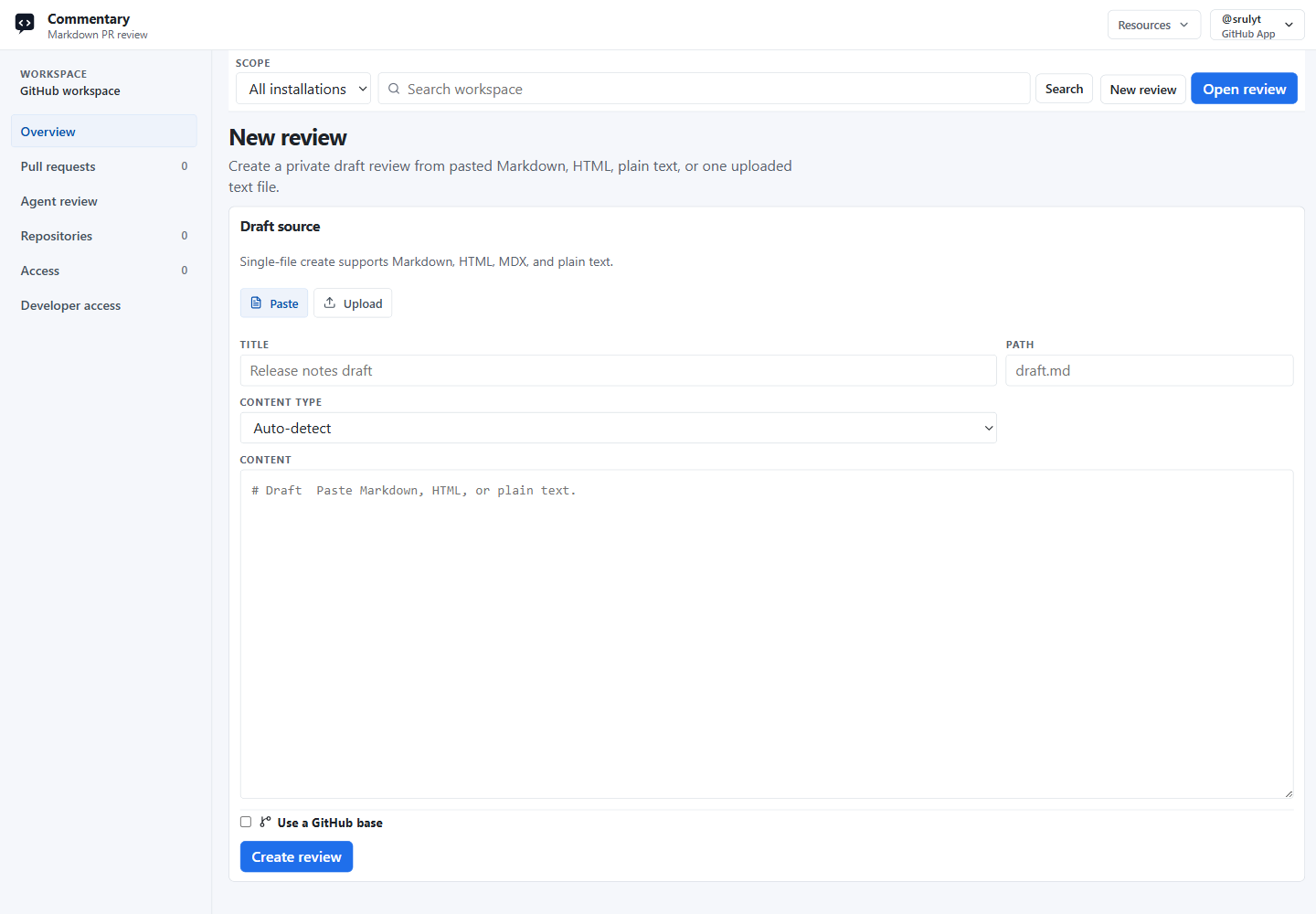
Create A Draft Review
- Sign in to Commentary.
- Open
New reviewfrom the homepage or workspace. - Choose
PasteorUpload. - Add a title.
- Paste Markdown, HTML, MDX, or plain text, or upload one text file.
- Click
Create review.
Pasted content can be auto-detected or explicitly marked as Markdown, HTML, or plain text. Upload accepts .md, .markdown, .mdx, .html, .htm, and .txt files.
Optional GitHub Base
Use Use a GitHub base when a local draft is related to an existing GitHub file, branch, or commit. Commentary stores owner, repository, ref, sha, and path metadata so agents and tools can compare draft revisions to a GitHub source and update the base later.
A GitHub base does not create a branch, open a pull request, or grant repository write access.
Review The Draft
Draft review pages use the same document-first review shell as Git-backed reviews:
Previewrenders the document for reading.Rawshows the source.- Comments attach to semantic blocks and selected text.
- Comment bodies can render safe Markdown, including code snippets and structured lists.
- Replies, resolve, reopen, and filters behave like ordinary review threads.
- Previous revisions remain readable but are read-only for new comments.
Draft comments stay in Commentary. They do not sync to GitHub or Azure DevOps provider reviews.
Revisions And Live Updates
Use Upload new revision to paste or upload replacement content. API, MCP, CLI, and agent clients can also create an empty draft first and upload the first revision later.
Revision uploads can be partial. If a tool uploads only changed files, Commentary carries omitted files forward into the new immutable revision.
Open draft pages listen for live comment, reply, status, revision, rebase, and deletion events. The Live control can pause or resume updates. Latest-mode pages refresh when a new revision arrives, while pinned previous-revision views stay on the selected revision.
Draft Actions
Use Draft actions from the review toolbar to:
- copy the review link
- copy the session id
- copy agent instructions
- share the draft review
- download the latest file
- change the GitHub base
- delete the draft review
- convert the draft to a Brainstorming Review when the review should become a plan-of-record workflow
Agent instructions are meant for coding agents or CLIs that are updating local files. Commentary expects the client to read local files and send literal content; it does not read local paths or fetch arbitrary URLs for the agent.
Commentary CLI
Use the Commentary CLI when a local file or directory is the editing surface.
Common commands:
commentary review ./docs/spec.md --title "Product spec"
commentary sync --message "Address review comments"
commentary comments --format markdown --open
commentary next-comment --timeout 60s --json
commentary share --anyone
commentary restore <session-id>
The CLI writes local review metadata to .commentary/session.json, but it does not store auth tokens there.
Brainstorming Reviews
Brainstorming Reviews use the same draft review routes and revision model, but add feedback signals, consensus rules, decision polls, and agent-ready accepted-change workflows.
Create one from the draft review form by choosing Brainstorming review, or convert an existing draft from Draft actions.
Sharing
Owners can create share links from Draft actions.
- Anyone-link sharing gives signed-in users access after they open the share URL.
- User-link sharing can target a GitHub username or email when Commentary can resolve the recipient.
- Owners can revoke links and remove claimed access grants.
- Shared viewers can comment, reply, and resolve when allowed, but cannot upload revisions, rebase, delete, reshare, or see hidden Git base metadata.
Shared draft URLs use /review/draft/share/{token} and still require sign-in before private content is shown.
API And MCP Use
Draft review automation is available through the public API and MCP:
- HTTP endpoints under
/api/v1/draft-reviews - the
draft_review,review_comments, andreview_documentMCP tools - scoped API tokens from Developer access
- CLI and agent workflows that send literal file content through the same API boundary
See API and MCP, API reference, and MCP tools.
What Draft Reviews Do Not Do
Draft reviews do not publish content to GitHub, create branches, commit files, open pull requests, or post provider review comments. Download or apply the latest content locally, then commit and push with your own Git credentials when the draft is ready.
Deleted drafts disappear from review pages, workspace lists, API responses, MCP reads, and live update streams immediately. Active Commentary storage, including uploaded or pasted raw/rendered draft artifacts, is purged within 24 hours. Provider systems, local checkouts, and platform backups have separate retention behavior.