Markdown compatibility2 detected · 0 enabled · 0 missing assets · mkdocs docs · 2 warnings
Docs project
mkdocs · Review Repository Branches · 28 section pages
Review Repository Branches
- HomeREADME.md
- Getting starteddocs/getting-started.md
- Core conceptsdocs/core-concepts.md
- Demo walkthroughdocs/demo-walkthrough.md
- Review pull requestsdocs/review-pull-requests.md
- Review repository branchesCurrent page
- Draft reviewsdocs/draft-reviews.md
- Brainstorming Reviewsdocs/brainstorming-reviews.md
- Live Preview Reviewsdocs/web-app-reviews.md
- Commentary Formsdocs/commentary-forms.md
- Review progressdocs/review-progress.md
- Review modesdocs/review-modes.md
- Workspacedocs/workspace.md
- Markdown renderingdocs/markdown-rendering.md
- Markdown extensionsdocs/markdown-extensions.md
- Static HTML reviewdocs/static-html-review.md
- Knowledge Braindocs/knowledge-brain.md
- Access and authenticationdocs/access-and-authentication.md
- Developer accessdocs/developer-access.md
- Generate a GitHub PATdocs/generate-a-github-pat.md
- Azure DevOpsdocs/azure-devops.md
- Commentary CLIdocs/commentary-cli.md
- Agent skillsdocs/agent-skills.md
- API and MCPdocs/api-and-mcp.md
- API referencedocs/api/reference.md
- MCP toolsdocs/api/mcp-tools.md
- Blogdocs/blog.md
- Troubleshooting and FAQdocs/troubleshooting-and-faq.md
Assets
1 resolved · 0 missing
Pro disabled
- MkDocsMkDocs is a Pro Markdown feature that is not enabled for this viewer. MkDocs-specific syntax remains visible as ordinary Markdown when compatibility rendering is unavailable.
- Repository link validationPro can validate links across this repo. Links still render with standard repository-aware rewriting.
DocsReview Repository Branches
28 pages from docs configurationmkdocs
Review Repository Branches
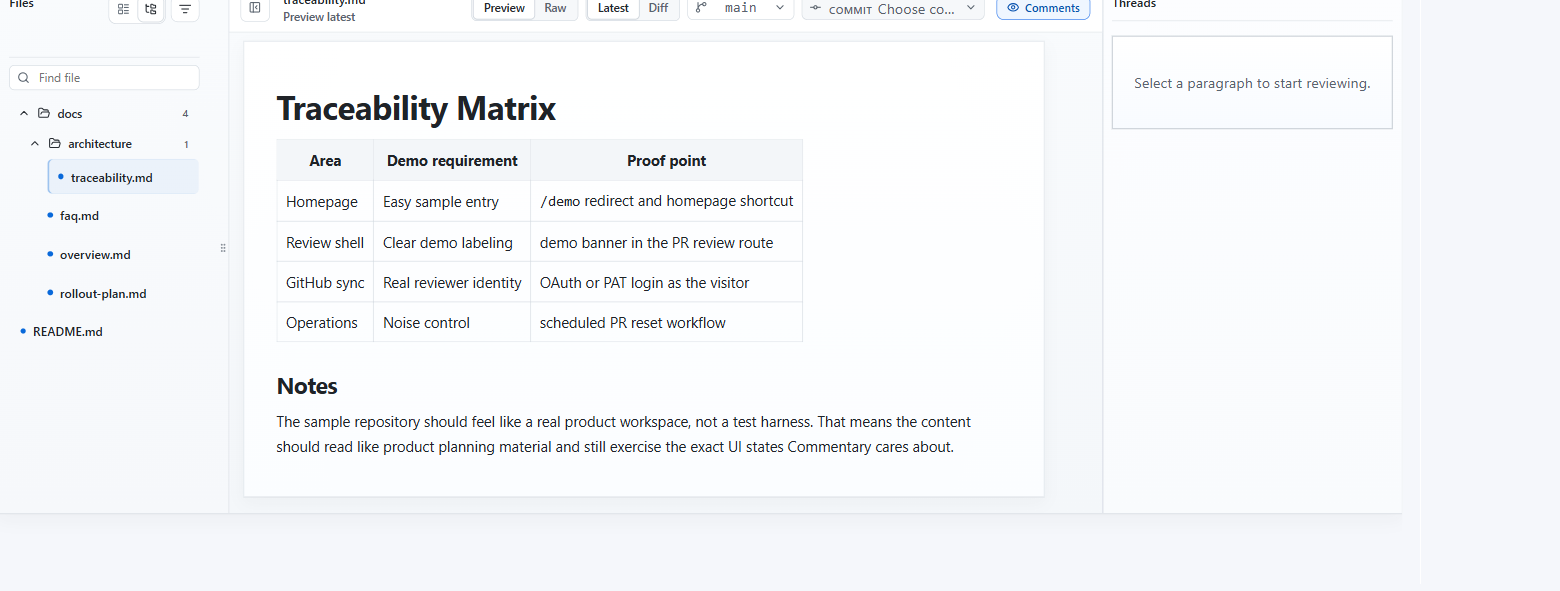
Use document review when Markdown or static HTML is in a repository but not necessarily in a pull request.
Open A Document Review
- Open /.
- Paste a repository, branch, folder, Markdown file, MDX file, or static HTML file URL.
- Click
Open review.
For GitHub, Commentary accepts repository roots, /tree/... URLs, and /blob/... Markdown or HTML URLs. For Azure DevOps, use a project-scoped repository, PR, branch, folder, or file URL when possible.
What Changes In Document Review
- The same reading shell is used.
- The page is labeled as repository document review instead of pull request review.
- There is no
Submit reviewbutton. Refresh documentreplacesRefresh PR.- Comments stay app-native in Commentary.
Branch, Folder, And File Navigation
- The file navigator lists reviewable Markdown, MDX, and static HTML files from the selected branch or folder.
- Use the branch selector to switch branch context when available.
- Use folder view for docs-heavy repositories.
- Use
Latestfor reading andDifffor branch-backed change inspection. - Use the commit selector when you need to inspect one document change set.
- Switch files inside the shell without a full page reload when the next document projection is available or can be materialized.
- Use personal Review progress to mark files or sections reviewed and revisit changed-since-reviewed content.
Best Use Cases
- specs that need early feedback before implementation is ready
- ADRs and product docs living on a shared branch
- README and docs maintenance outside a PR moment
- AI-generated docs that should be reviewed before a merge request exists
- generated static reports or static site pages that need document comments
- Knowledge Brain branches where source notes, wiki pages, and outputs should be reviewed together
- merged PR follow-up when a GitHub PR has already landed and the review should continue against the target branch
Important Difference From PR Review
Document review does not submit a provider review event. It is designed for app-native collaboration around repository documents.