Markdown compatibility1 detected · 1 enabled · 0 broken links · 0 missing assets · mkdocs docs
Docs project
mkdocs · Review Repository Branches · 28 section pages
Review Repository Branches
- HomeREADME.md
- Getting starteddocs/getting-started.md
- Core conceptsdocs/core-concepts.md
- Demo walkthroughdocs/demo-walkthrough.md
- Review pull requestsdocs/review-pull-requests.md
- Review repository branchesCurrent page
- Draft reviewsdocs/draft-reviews.md
- Brainstorming Reviewsdocs/brainstorming-reviews.md
- Live Preview Reviewsdocs/web-app-reviews.md
- Commentary Formsdocs/commentary-forms.md
- Review progressdocs/review-progress.md
- Review modesdocs/review-modes.md
- Workspacedocs/workspace.md
- Markdown renderingdocs/markdown-rendering.md
- Markdown extensionsdocs/markdown-extensions.md
- Static HTML reviewdocs/static-html-review.md
- Knowledge Braindocs/knowledge-brain.md
- Access and authenticationdocs/access-and-authentication.md
- Developer accessdocs/developer-access.md
- Generate a GitHub PATdocs/generate-a-github-pat.md
- Azure DevOpsdocs/azure-devops.md
- Commentary CLIdocs/commentary-cli.md
- Agent skillsdocs/agent-skills.md
- API and MCPdocs/api-and-mcp.md
- API referencedocs/api/reference.md
- MCP toolsdocs/api/mcp-tools.md
- Blogdocs/blog.md
- Troubleshooting and FAQdocs/troubleshooting-and-faq.md
Internal links
1Total
1Resolved
0Broken
0Ambiguous
Assets
1 resolved · 0 missing
Enabled
- MkDocsMkDocs rendering is enabled. MkDocs-specific syntax remains visible as ordinary Markdown when compatibility rendering is unavailable.
DocsReview Repository Branches
28 pages from docs configurationmkdocs
Review Repository Branches
Use document review when Markdown or static HTML is in a repository but not necessarily in a pull request.
Open A Document Review
- Open /.
- Paste a repository, branch, folder, Markdown file, MDX file, or static HTML file URL.
- Click
Open review.
For GitHub, Commentary accepts repository roots, /tree/... URLs, and /blob/... Markdown or HTML URLs. For Azure DevOps, use a project-scoped repository, PR, branch, folder, or file URL when possible.
What Changes In Document Review
- The same reading shell is used.
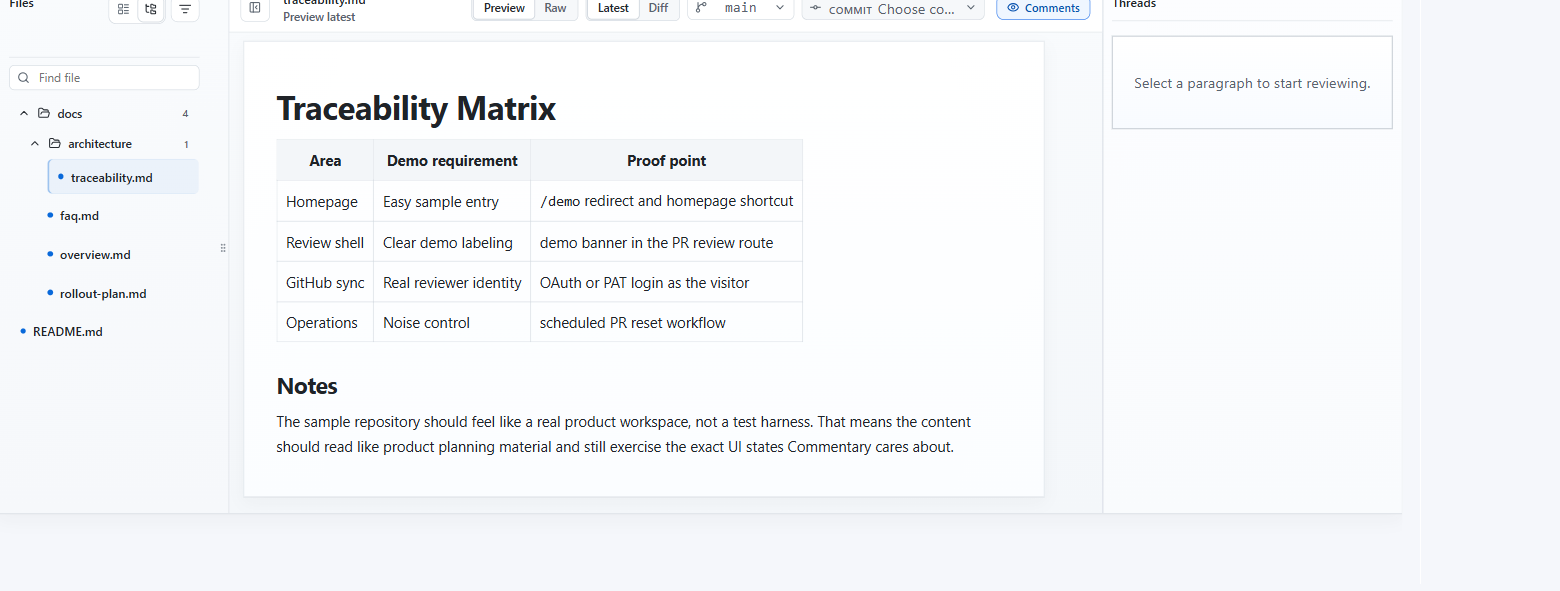
- The page is labeled as repository document review instead of pull request review.
- There is no
Submit reviewbutton. Refresh documentreplacesRefresh PR.- Comments stay app-native in Commentary.
Branch, Folder, And File Navigation
- The file navigator lists reviewable Markdown, MDX, and static HTML files from the selected branch or folder.
- Use the branch selector to switch branch context when available.
- Use folder view for docs-heavy repositories.
- Use
Latestfor reading andDifffor branch-backed change inspection. - Use the commit selector when you need to inspect one document change set.
- Switch files inside the shell without a full page reload when the next document projection is available or can be materialized.
- Use personal Review progress to mark files or sections reviewed and revisit changed-since-reviewed content.
Best Use Cases
- specs that need early feedback before implementation is ready
- ADRs and product docs living on a shared branch
- README and docs maintenance outside a PR moment
- AI-generated docs that should be reviewed before a merge request exists
- generated static reports or static site pages that need document comments
- Knowledge Brain branches where source notes, wiki pages, and outputs should be reviewed together
- merged PR follow-up when a GitHub PR has already landed and the review should continue against the target branch
Important Difference From PR Review
Document review does not submit a provider review event. It is designed for app-native collaboration around repository documents.