Markdown compatibility2 detected · 0 enabled · 0 missing assets · mkdocs docs · 2 warnings
- HomeREADME.md
- Getting starteddocs/getting-started.md
- Core conceptsdocs/core-concepts.md
- Demo walkthroughdocs/demo-walkthrough.md
- Review pull requestsdocs/review-pull-requests.md
- Review repository branchesdocs/review-repository-branches.md
- Draft reviewsdocs/draft-reviews.md
- Brainstorming Reviewsdocs/brainstorming-reviews.md
- Live Preview Reviewsdocs/web-app-reviews.md
- Commentary Formsdocs/commentary-forms.md
- Review progressdocs/review-progress.md
- Review modesdocs/review-modes.md
- WorkspaceCurrent page
- Markdown renderingdocs/markdown-rendering.md
- Markdown extensionsdocs/markdown-extensions.md
- Static HTML reviewdocs/static-html-review.md
- Knowledge Braindocs/knowledge-brain.md
- Access and authenticationdocs/access-and-authentication.md
- Developer accessdocs/developer-access.md
- Generate a GitHub PATdocs/generate-a-github-pat.md
- Azure DevOpsdocs/azure-devops.md
- Commentary CLIdocs/commentary-cli.md
- Agent skillsdocs/agent-skills.md
- API and MCPdocs/api-and-mcp.md
- API referencedocs/api/reference.md
- MCP toolsdocs/api/mcp-tools.md
- Blogdocs/blog.md
- Troubleshooting and FAQdocs/troubleshooting-and-faq.md
- MkDocsMkDocs is a Pro Markdown feature that is not enabled for this viewer. MkDocs-specific syntax remains visible as ordinary Markdown when compatibility rendering is unavailable.
- Repository link validationPro can validate links across this repo. Links still render with standard repository-aware rewriting.
Workspace
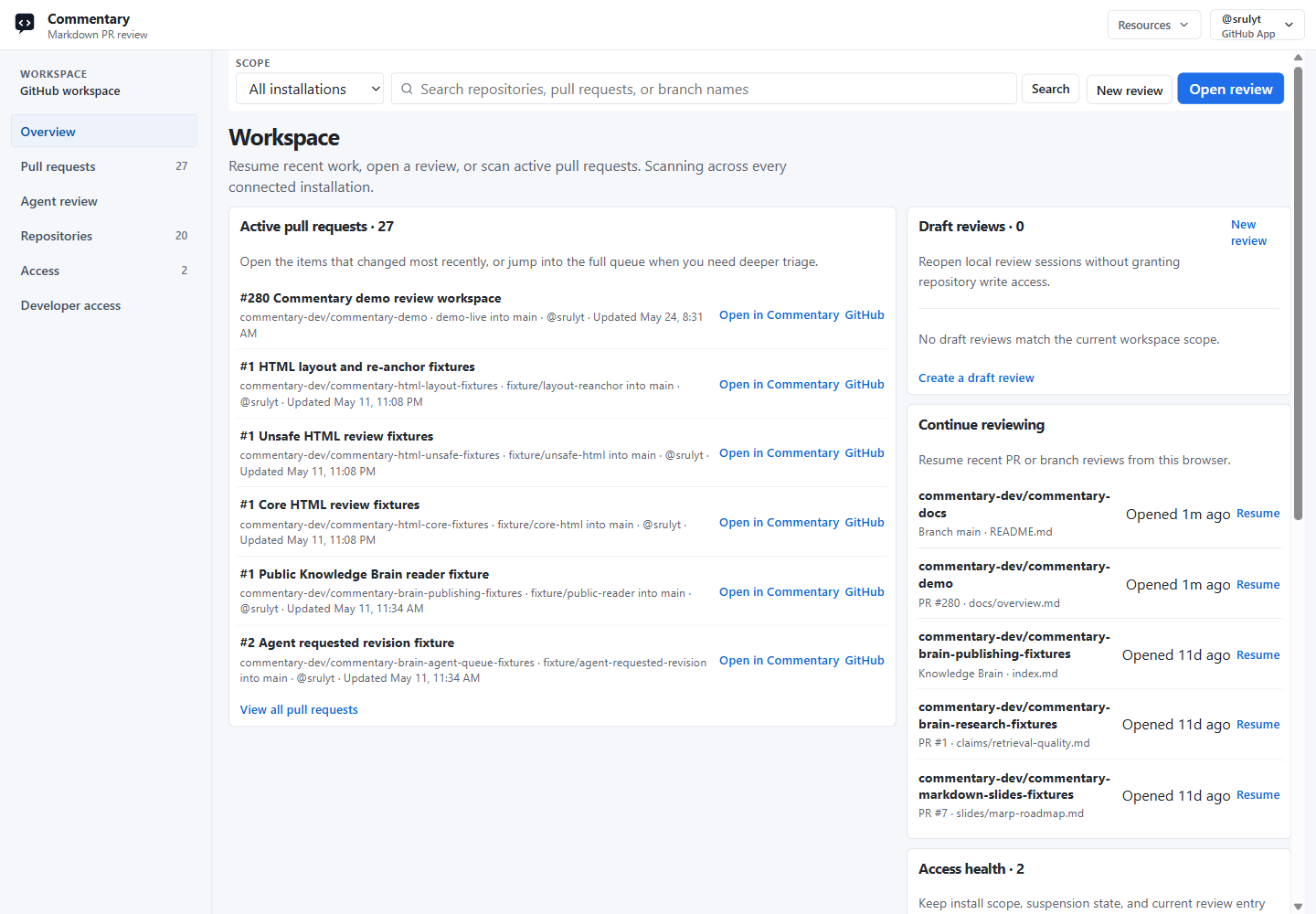
The workspace is the signed-in view for finding review work, managing source-backed Forms, creating drafts, and managing developer access across connected provider accounts.
What The Workspace Does
- shows active pull requests
- lists repositories in scope
- resumes recent review sessions from this browser
- shows provider access health
- opens PR review and branch review without copying URLs
- creates and resumes draft reviews
- creates and resumes Brainstorming Reviews
- lists source-backed Forms, response links, result-share links, submissions, exports, and destination status
- creates and resumes Live Preview Reviews
- manages API, OAuth, device-flow, and MCP grants
- supports CLI and agent workflows through developer access
- exposes Knowledge Brain-oriented review queues when available
GitHub workspace uses GitHub App installation scope. Azure DevOps workspace uses Microsoft Entra or Azure DevOps PAT access. Draft reviews, Forms records, Live Preview Reviews, and developer credentials are tied to the signed-in Commentary account.
Main Sections
Overview
Use Overview to scan recent PR work, continue recent reviews, jump into repositories in scope, and resume draft reviews.
Pull requests
Use Pull requests when you need a queue of active PRs. You can search by repository, PR title, branch, or author details shown by the provider.
Repositories
Use Repositories to open branch review directly or narrow the PR queue to one repository.
Draft reviews
Use New review or the draft review list when you need document-style feedback before a branch or pull request exists. Draft reviews can be created from pasted Markdown, HTML, MDX, plain text, Form Contract files, or uploaded text files. See Draft reviews.
Use Brainstorming Reviews when collaborators need to discuss options, signal agreement or blockers, and let agents apply accepted changes. See Brainstorming Reviews.
Forms
Use Forms for source-backed form collections the current user can manage or has discovered from review surfaces. The Forms workspace can show source links, response links, result-share links, submissions, exports, diagnostics, and destination status.
Form authoring stays in PR, branch, draft, Markdown, HTML, MDX, standalone YAML/JSON, or dedicated fillout source artifacts instead of a standalone workspace editor. See Commentary Forms.
Live Preview Reviews
Use Live Preview Reviews for customer-owned deployed or localhost app previews. The reviewed app loads in your browser, connects through the opt-in Review SDK, and lets reviewers leave comments on selected UI elements. Deployed reviews can be shared by owner-created links; localhost reviews cannot be shared. See Live Preview Reviews.
Agent review
Use Agent review when it is available to scan likely agent-maintained Knowledge Brain pull requests, unresolved review notes, and requested-revision follow-up work.
Access
Use Access to inspect connected installations, organizations, repository reachability, and provider permission state.
Developer access
Use Developer access to create API tokens, inspect OAuth/device-flow grants, choose standard or custom scopes, and revoke credentials used by API clients, MCP clients, the Commentary CLI, and agents. See Developer access.
GitHub Workspace
GitHub workspace depends on GitHub App installation. If a repository is missing, install Commentary for that repository, switch account, or use a PAT fallback when your organization requires token access.
Azure DevOps Workspace
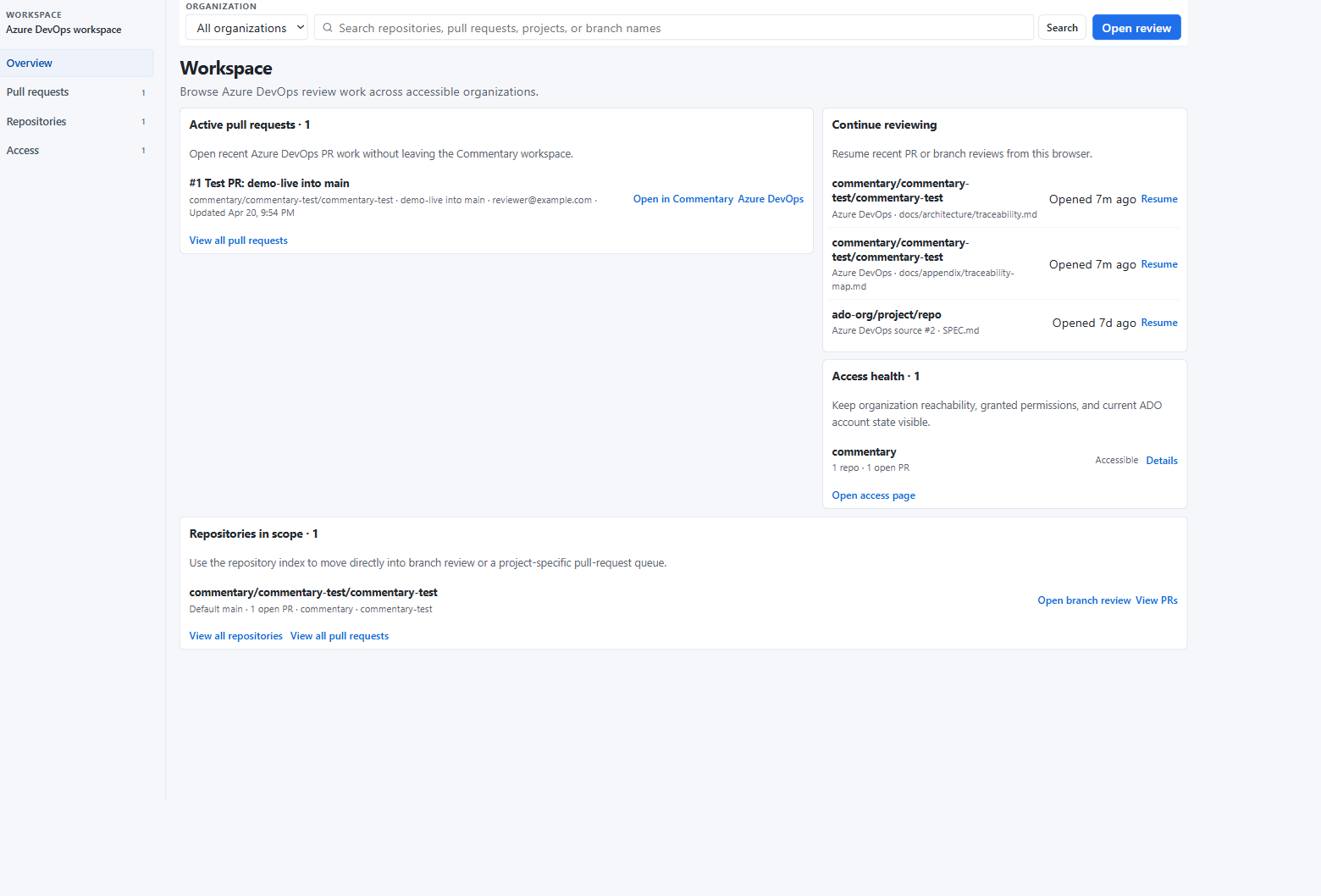
Azure DevOps workspace follows the organization, project, repository, and pull request hierarchy. Use the organization selector when your account can access more than one organization.
Opening A Review
Use Open review in the workspace header to paste a URL without returning to the homepage. Repository rows also include shortcuts for branch review and PR queues.
For draft work, create a Draft review. For structured answers, open Commentary Forms. For Knowledge Brain work, open a Brain branch or PR in the review shell and use Brain mode to group source, wiki, output, and control files. See Knowledge Brain.